

Setup and agents
Every page shows a model provider banner
None of your model providers can run models right now. The banner shows on every dashboard page except Model providers, which lists each fix.
The banner clears when the provider’s models refresh. The CLI (
oqoqo project ai inspect) and the plugin (inspect_project_ai) return the same problem in blockers, with a link to the page where you fix it.
Models are missing after you connect a provider
The models haven’t refreshed, or the provider doesn’t offer them for your key. Gateways such as OpenRouter and Vercel AI Gateway show only the models that they expose for your key. A provider’s Models table lists only the models that your credentials can use. While the provider shows Refreshing models, wait for the refresh to finish. After it, look under the table for the models that can’t be used, with the reason for each.- Confirm the connection under Organization settings → Model providers.
- Open the provider and select Refresh models.
- Reopen Manage → Agents and Organization settings → Oqoqo AI defaults.
An agent will not enable or run
The agent has no provider it can use, or the connection is broken.- Connect a provider the agent supports under Organization settings → Model providers, or a personal integration under Profile → Integrations.
- Turn on the agent under Manage → Agents.
- Check the agent’s page for provider notices about missing models or broken connections.
Connect custom agent is not available
Custom agents are in private beta. Email support@oqoqo.ai to enable them for your organization. If Connect custom agent shows Upgrade, your plan does not include custom agents (What your plan includes).A custom agent needs attention
The custom agent failed to install, start, or answer, or it needs a value. On the agent’s page under Manage → Agents, the Status section shows what failed, the agent’s own error, and the fix. Change the setting that the fix names, then select Test agent. If a run failed before the agent answered, the run page shows the same fix with a link such as Go to Models.Ask Oqo says it needs a model
No model is set for Ask Oqo.- Connect a provider under Organization settings → Model providers.
- Choose an Ask Oqo model under Organization settings → Oqoqo AI defaults.
- Refresh the page and open Ask Oqo again.
A Claude Subscription model is missing from Ask Oqo
This is expected. Ask Oqo doesn’t support models from Anthropic (Claude Subscription), although Evals and Insights can use them. Choose an Ask Oqo model from another provider, such as OpenAI (ChatGPT Subscription) or Nous Portal.Launches and runs
Launch is blocked by the run balance
Your organization doesn’t have enough runs for the launch. Subscribe or top up under Organization settings → Usage & billing. Runs and billing explains the run balance, and the Pricing page lists the plans.Launch is blocked by turned-off MCP tools
Select Open treatment in the message, then fix the cause. Learn more in Turn off MCP tools.A run could not start because a setup command failed
A setup command exited with an error or timed out, so the agent never started. This covers a machine’s Custom installs and Setup commands, a CLI’s or SDK’s install command, and a CLI’s Post-install commands (when they run). Fix the command and launch again. The blocked run gets no Evals, doesn’t count toward pass rate, and doesn’t use your run balance. Oqoqo doesn’t retry it, because it would fail the same way. The exception is a package install where the registry or mirror didn’t answer: Oqoqo retries that for you.- Dashboard
- CLI
- Plugin (MCP)
The run page names the failed step, such as CLI “Elastic CLI” post-install command failed or timed out, with its number when there are several, such as Machine “Dev box” setup command 3 failed. Below it are what to fix, the exit code, and the failing output line, such as 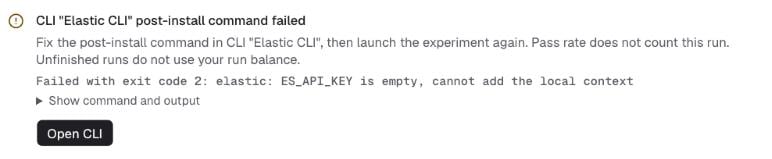
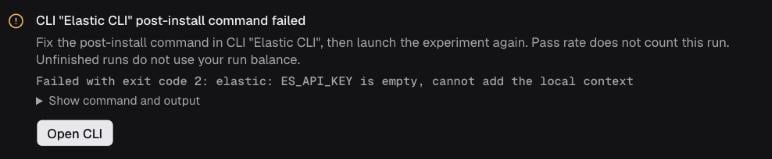


npm error 404 Not Found. Select Show command and output for more, or Open CLI, Open Machine, or Open SDK to fix the command.- Timeouts: all setup commands share one time limit (“Setup reached its 10-minute limit while CLI “Elastic CLI” post-install command was running.”). Shorten the setup commands.
- Multi-line install commands can’t run. Join the lines with
&&or end each with\. - Package installs: the message names the package manager, such as npm install failed, and the machine and tools whose packages it installs, with a link when only one of them declared the packages. Check the package names there.
blockedReason in the CLI and the plugin, with a cause and a one-line message.
setupFailure fields
setupFailure fields
Secret values are redacted, as in the run’s trajectory.
A run could not start because of its machine
The run’s machine can’t run it, so the agent never started. The run page names the cause, shows the details under it, and has an Open Machine button. Oqoqo doesn’t retry the run, because it fails the same way until you change the machine.

The CLI and the plugin return the cause, the details, the machine’s
key and name, and for a service its service, in blockedReason (machine_service or machine_node_version). oqoqo runs profile also prints the oqoqo resources inspect machine command for it.
Launch is blocked by saved header values
The launch stops withmcp_header_values_unbound when a selected MCP server version would send its saved header values, or its OAuth app’s client secret, to an address that no person bound them to. This happens most often after an AI assistant saves the server at a new URL. The message names the server, the version, and the full address.
- Select Open Tools tab in the message, or open the blocker’s
setupUrlfrom the CLI or the plugin. - If you expect the address, select Refresh. If you don’t, save a new version of the server with the correct address instead.
- Go back to the launch. The dashboard checks the launch again when you return to its tab.
error.message in the CLI and the plugin points to the Tools tab. Bind the values the same way and launch again; stopped runs do not count against your run balance. Learn more in Saved header values and the server address.
Launch is blocked by a variable name that two places set
The blockervariable_name_clash means two places—such as two MCP servers or a CLI and a model provider—set the same variable name to different values. Only a CLI or SDK can override a machine variable, and an agent can receive only one value per name. The error names both places and the affected tasks, treatments, or agents.
Select the link in the message, and remove or rename the variable in one place (for a model provider clash, change the task input). Scheduled launches are not blocked by this error. Learn more in When two places set the same variable.
A run errored or was cancelled
Open the run to read its recorded error, fix the provider, machine, files, or tools, and launch again. Errored and cancelled runs do not count against your run balance.The plugin or the CLI cannot accept a secret
This is expected. Enter OAuth sign-ins, API keys, and secret headers only in the dashboard using the link the tool or command returns. Runoqoqo setup links or ask for Get secure setup links (get_setup_links) to list every pending link.
Max Concurrency feels too low
Your plan’s concurrent runs limit and platform limits can keep fewer runs active than your Max Concurrency value. Extra runs wait their turn (What your plan includes). Set a lower value yourself when runs use tools that change the same data, so that they don’t overwrite each other’s changes. Learn more in Set Max Concurrency.A schedule is paused or skips launches
A schedule skips a launch while its last experiment is still running (“Skipped the last 3 launches because the previous experiment was still running. Choose a less frequent repeat.”). Choose a less frequent repeat, or cancel the running experiment. When a launch needs a fix, Oqoqo pauses the schedule and shows Needs attention. The schedule page says why and links to the fix:
If the schedule launches its experiment in Agent mode and your organization can no longer use it, Oqoqo pauses the schedule and tells its owners in the app and by email: “This schedule launches its experiment again in Agent mode, which your organization can’t use now. Launch the experiment again in Standard mode, point the schedule at the new experiment, and resume the schedule.”
A schedule also pauses when a plan change leaves more active schedules than your plan allows. Change the plan or pause another schedule, then select Resume (Move to a lower plan).
Fix the cause, then select Resume next to the fix link. Resume checks the launch again, and if something still blocks it, the page lists every problem with its fix link. Learn more in When Oqoqo pauses a schedule.
Evals and Insights
Evals or Insights did not run
The models weren’t set, or Evals or Insights was off at launch.- Choose the Evals model, Insights model, and Experiment insights model under Oqoqo AI defaults.
- On the experiment, select Run evals or Run insights.
Evals or Insights could not evaluate a run
The run says “Evals could not evaluate this run, so it has no Pass or Fail.” or “Insights could not analyze this run.”, followed by the cause:
To rerun, select Rerun evals or Rerun Insights on the experiment, as described in Run Evals again and Run Insights again.
Evals or Insights say the model declined to review a run
The run says “The model declined to review this run.” Models can refuse runs on security topics, such as an agent searching for API keys, and Oqoqo doesn’t retry with the same model.- Under Oqoqo AI defaults, choose another Evals model, Insights model, or Experiment insights model.
- Select Rerun evals or Rerun Insights on the experiment.
error.
Evals or Insights did not read the whole run
The recorded work didn’t fit the model’s context window, and a note on Evals or Traces says the model didn’t read every step or changed file. Traces over 32 MB aren’t saved, and the note says so. If Evals or Insights fails because the work doesn’t fit, the message names the model. Choose an Evals model, Insights model, or Experiment insights model with a larger context window under Oqoqo AI defaults, then run it again. Learn more in What Evals read and What Insights read.Agent mode is not available
Agent mode for Evals and Insights is in private beta. Email support@oqoqo.ai to enable it for your organization, and say which feature you want it for. Until then, New experiment, Run evals, Rerun evals, Run insights, and Rerun Insights show no Mode choice for that feature. The CLI and the plugin refusemode: "agent" with agent_mode_unavailable: “Agent mode isn’t available for your organization. Use Standard mode instead.”
If the Agent choice is turned off and Mode shows Upgrade, or the refusal is plan_upgrade_required, your plan does not include that Agent mode (What your plan includes).
If your organization can no longer use Agent mode for an experiment that used it:
- The Rerun evals dialog says “This experiment used Agent mode, which your organization can’t use now. These Evals use Standard mode.” Rerun Insights says the same about Insights. The new attempt uses Standard mode.
oqoqo evals previewandoqoqo insights previewsay “This experiment launched in Agent mode, which your organization can’t use now. Add —mode standard to insights trigger.” (orevals trigger).- A CLI rerun without
--modeis refused with “This experiment launched Insights in Agent mode, which your organization can’t use now. Rerun with —mode standard.” (or “launched Evals”). Add--mode standard. From the plugin, the message saysmode: "standard", so add that. - A schedule that launches the experiment again in Agent mode pauses. See A schedule is paused or skips launches.
Agent mode cannot use the model
Agent mode needs models that can call tools and have a known context window: the Evals model for Evals, and both the Insights model and the Experiment insights model for Insights. Oqoqo checks the models before it launches or reruns, and nothing starts until every model can run Agent mode. The dashboard, the CLI, and the plugin show the same sentence, with the codeagent_mode_model_unsupported. The sentence names the model that can’t run Agent mode, for example:
- “Agent mode can’t use Claude Pro / Max models. Choose an Evals model from an API-key provider, or use Standard mode.”
- “Agent mode can’t use model. It needs an Insights model that can call tools and has a known context window. Choose another Insights model, or use Standard mode.”
Agent mode did not return a result
An Oqoqo agent stopped before it returned its result. The message says what’s missing, then gives the cause and what to do:- For Evals, the run’s Evals tab and its CLI and plugin results say “Evals could not evaluate this run, so it has no Pass or Fail.”
- For Insights, the run’s result in
oqoqo insights getandget_insights_resultssays “Insights could not analyze this run.” (not yet shown in the dashboard). - When the insights agent cannot group frictions, the Insights attempt’s
errorinoqoqo insights list,list_insights, andget_insights_resultssays “Insights could not group this experiment’s frictions.” Each run’s review still stands.
To rerun only failed runs, select Only process the N runs that failed last time in Rerun evals or Rerun Insights. From the CLI, pass the preview’s
failedRunIds to oqoqo evals trigger --run-ids or oqoqo insights trigger --run-ids; from the plugin, pass them as run_ids to trigger_evals or trigger_insights. A grouping failure has no failedRunIds, and a full Insights rerun in Agent mode reviews every run again.
The Frictions list is empty
Most frictions come from Insights, so the list fills in as Insights review the runs.Ask Oqo
Ask Oqo says the connection was lost
Ask Oqo lost its connection, for example after your computer slept or your network changed. Select Reconnect, or wait for your network to come back. Your chat and its replies are kept.Ask Oqo says the chat has ended
Read the tool results in the original chat to see which actions finished. While its history is available, send your next message in Continue in a new chat. If the history has expired or the original chat is unavailable, send your draft in Start a new chat. You can review the draft and its attachments before sending.Ask Oqo cannot read a GitHub repository
Ask Oqo reads only public GitHub repositories. If the repository is private, or the name is wrong, GitHub says that it doesn’t exist. If Ask Oqo shows Sign in with GitHub, sign in to connect GitHub.CLI
The CLI does not accept an API key
The key isn’t a personal key, or it was revoked.- Check that
OQOQO_API_KEYholds a personal key from Profile → API keys. Organization API keys can’t use the CLI. - If you revoked the key, create a new one.
- To use your browser sign-in instead, unset
OQOQO_API_KEYand runoqoqo login.
The CLI says this version cannot run this command
The installed release is older than the releases that Oqoqo accepts. The command exits with code4 (client_update_required with --output json) and prints:
oqoqo upgrade, then run the command again. oqoqo upgrade, oqoqo version, and oqoqo schema still work because they don’t contact Oqoqo. If oqoqo upgrade can’t write the binary, install the CLI again, as described in When Oqoqo refuses an old release.
The CLI inside a run doesn’t update itself. If a custom agent downloads the CLI, as when you run Ask Oqo as a custom agent, enter a current url and sha256 in the agent’s settings.
Plugin (MCP)
The Oqoqo Plugin does not install, sign in, or show its tools
See Troubleshoot the plugin for fixes to:- Failing install commands (
marketplace addor host CLI version) - Sign-in not opening or finishing (including
organization_ambiguous) - Missing Oqoqo tools or skills in a session
- Conflicts when both the plugin and a direct MCP entry exist
Tools and files
GitHub import fails
Oqoqo imports tools only from publicgithub.com repositories. After an import, use Check for updates to refresh it. The From GitHub lists show these messages:
MCP server sign-in fails
Learn more in MCP server sign-in.
An MCP server’s tools do not show
The server’s Tools tab says why it has no list. Oqoqo keeps the last list when a check fails.
If the tab says Saved values are not bound to this address, Oqoqo doesn’t check or launch that version until a person selects Refresh. The address shows under Refresh, in Binds the saved values to …. Learn more in Saved header values and the server address.
The CLI or the plugin cannot refresh an MCP server’s tools
oqoqo mcp tools refresh and Refresh an MCP server’s tools (refresh_mcp_server_tools) fail with mcp_tool_check_needs_web when the version’s saved values aren’t bound to its address. Only a person in the dashboard can bind them.
- Open the
setupUrlin the error to go to the version’s Tools tab. - Read the address under Refresh, in Binds the saved values to ….
- If you expect it, select Refresh to send the values there and bind them. If you don’t, save a new version of the server with the correct address instead.
Sharing
You cannot share an experiment publicly
If the Share experiment dialog says “Finish the experiment before you can share it publicly,” wait for the experiment to finish. You can still invite a teammate to view it (Share results).Account
Your plan does not include a feature, or a limit is reached
In the dashboard, a feature that your plan does not include shows Upgrade, which opens Organization settings → Usage & billing with the plans that include it marked. The CLI and the plugin refuse with one of these codes:
Run
oqoqo plan inspect, or ask for Get the organization’s plan, limits, and features (inspect_plan), to see each limit and feature. Learn more in What your plan includes.
You cannot delete a project
You can’t delete the organization’s only project. Create another project first.You cannot leave the organization
- You’re the only member. Invite a teammate and make them an admin before you leave.
- You’re the only admin and others remain. Make another member an admin under Organization settings → Members first.
You cannot delete your account
You’re the only admin of an organization that has other members, and the dialog names it. Make another member an admin under Organization settings → Members, then delete your account.Oqoqo asks you to create an organization when you sign in
No organization opens for you: an admin removed you, you left, or your organization was deleted. The Organizations page names the organization you lost. Ask one of its admins to invite you again, join another organization that invited you, or create one.Notifications keep arriving in the app after you change your preferences
In-app is still on for that kind of notification, because email and in-app are separate. Turn off In-app for that kind under Profile → Notifications. Account and sign-in and Operational alerts always stay on.Related
FAQ
Find answers to common questions.
Model providers
Connect and fix the providers that supply models.
Launch an experiment
Launch again after you fix the cause.
CLI reference
Look up each command and its flags.