

- Oqoqo MCP server (
https://mcp.oqoqo.ai/mcp): exposes the same capabilities as the CLI and Ask Oqo, authenticated via OAuth. (This operates your Oqoqo projects and is separate from MCP servers you evaluate as tools.) - Four skills: teach your AI assistant how to design eval sets, write fair rubrics, set up clean baselines, and interpret comparisons accurately.
Prerequisites
- An Oqoqo account with at least one project, connected model providers, Oqoqo AI models, and available runs (check your setup).
- ChatGPT (Codex), Claude Code, Cursor, or GitHub Copilot (for other MCP hosts, connect without the plugin).
Install the plugin
Add theoqoqo marketplace and install oqoqo from the public Oqoqo-Inc/agent-plugin repository.
- ChatGPT (Codex)
- Claude Code
- Cursor
- GitHub Copilot
https://docs.oqoqo.ai/llms.txt.
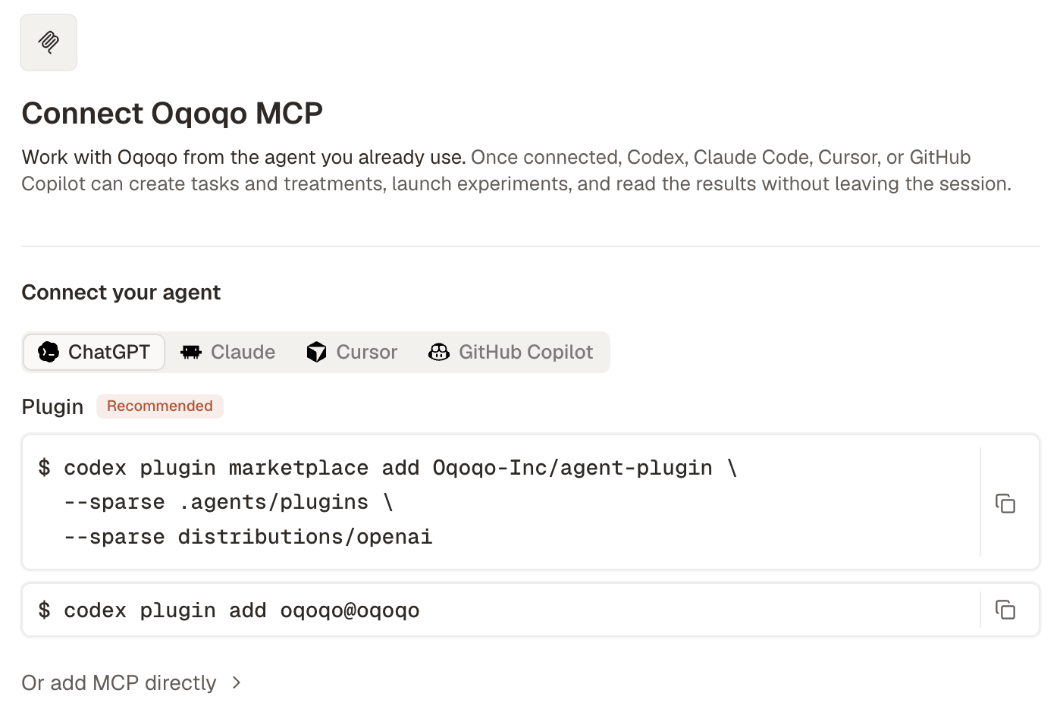
Sign in
The first time your host connects, it opens Oqoqo sign-in in your browser so your AI assistant acts with your permissions (sign-in rules).
Start a new session and ask “Who am I signed in to Oqoqo as?”—your assistant calls Get the signed-in user and organization (
get_identity) to verify the connection.
Turn on tool approval
In your host’s settings, disable auto-approval for Oqoqo write tools—especially Launch an experiment (launch_experiment)—so your assistant prompts you before executing them (Approvals).
What your AI assistant can do
For any step requiring a secret or payment, your assistant returns a direct dashboard link (secrets stay in the dashboard). See Plugin (MCP) tools for all 80 tools.
Always name the project in your prompt. The plugin does not store a default project across calls (Projects).
Try a first prompt
Build an eval set and read its results
Your AI assistant can read a public documentation URL, or local docs, READMEs, and OpenAPI files directly inside your repository:1
Build the eval set
Ask your AI assistant to generate tasks, a machine, tools, and treatments from your docs:The
product-eval-authoring skill creates the resources via bulk_author_resources, runs preflight_experiment, and lists dashboard links for any secrets needed.2
Enter secrets in the dashboard
Open each returned link to add API keys or OAuth connections, and confirm your target agents are enabled under Manage → Agents.
3
Launch the experiment
product-eval-results skill previews the run count, launches with launch_experiment after your approval, and monitors progress with get_experiment_status. For larger experiments, you can watch live progress at the returned dashboardUrl or ask your assistant to check status again later.4
Review the results
analyze_results and list_frictions. Open the experiment in the dashboard anytime to view Matrix and Frictions visually.Skills in the plugin
Your assistant loads each skill automatically when relevant (or when you name it). See Plugin (MCP) skills for full workflows and tool lists.Update or remove the plugin
Update the plugin
MCP tools update automatically on Oqoqo’s server, while locally installed skills update when your host updates the plugin:- Codex: updates automatically on startup.
- Claude Code: updates automatically after you enable auto-update under
/plugin → Marketplaces → oqoqo → Enable auto-update(run/reload-pluginsafter an update). - Cursor and GitHub Copilot: require manual updates.
get_project_context returns pluginUpdate (recommended or required) when a skill update matters, so your assistant alerts you with your host’s commands.
- ChatGPT (Codex)
- Claude Code
- Cursor
- GitHub Copilot
Start a new session or run:Check version with
codex plugin list -m oqoqo.Turn off or remove the plugin
Disabling or removing the plugin leaves your Oqoqo organization unchanged. Sign out first if you also want to clear cached OAuth tokens.- ChatGPT (Codex)
- Claude Code
- Cursor
- GitHub Copilot
Toggle off via
/plugins (Space on oqoqo) or enabled = false in ~/.codex/config.toml. Sign out and remove:Troubleshoot the plugin
An install command fails
An install command fails
- Unknown command/flag: update your host CLI first, or connect without the plugin.
- Marketplace already exists: skip the
marketplace addline and run the install command. - Network/download errors: verify access to
github.com.
Sign-in does not open or finish
Sign-in does not open or finish
Run the host’s sign-in step (
plugin:oqoqo:oqoqo in Claude Code, oqoqo elsewhere). If you belong to multiple organizations and calls fail with organization_ambiguous, sign out and sign back in while selecting the right organization.Oqoqo tools or skills are missing
Oqoqo tools or skills are missing
Start a fresh session, verify the plugin is enabled (
list commands or /plugin), and confirm /mcp shows an active sign-in. If tools work without skills, you have a direct MCP connection—switch to the plugin or install skills separately.The plugin and a direct connection are both set up
The plugin and a direct connection are both set up
Having both can duplicate tools or hide
plugin:oqoqo:oqoqo (Claude Code hides the plugin’s server when a direct oqoqo entry exists). Remove the direct entry and restart your session:Connect without the plugin
Use direct MCP when your host lacks plugin support, to add the optionaloqoqo-product-docs search server (https://docs.oqoqo.ai/mcp), or to authenticate headless runs with an API key. (Never configure both the plugin and a direct oqoqo connection in the same host.)
Add MCP directly
- ChatGPT (Codex)
- Claude Code
- Cursor
- GitHub Copilot
Sign in with an API key
In headless CI or automated machines, store a personal API key inOQOQO_API_KEY and send Authorization: Bearer <key> instead of OAuth (invalid or revoked keys return 401).
- ChatGPT (Codex)
- Claude Code
Add to
~/.codex/config.toml:Add the skills without the plugin
Install the four skills standalone for direct MCP or CLI workflows (omit-g for project-local install; never run this alongside the plugin):
npx skills update or remove with npx skills remove.
Next steps
Measure a tool's impact
Run a complete lift experiment from your AI assistant.
Plugin (MCP) reference
Learn auth, approvals, paging, polling, and error handling.
Plugin (MCP) tools
Browse all 83 tools by area.
Use the CLI
Automate experiments from your terminal and CI.